Caller Name Announcer1.2.2
Publisher Description

Stay connected & custom call screen with the call identifier & SMS announcer app
Are you tired of missing important calls or messages when your phone is on silent mode? Do you want to know who is calling or texting you without looking at your phone? Do you wish to personalize your call screen with beautiful call screen themes and flash alerts? Congratulations! Caller Name Announcer is the app for you!
Caller Name Announcer is the ultimate caller ID app for those who want to stay connected while on the go. With its powerful call identifier feature, you will never miss an important call again.
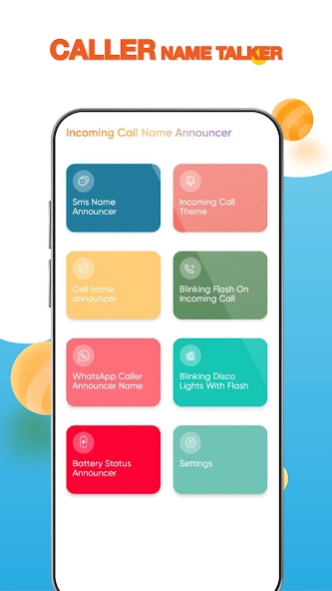
Caller identifier app enhances your calling experience with various features:
📞 Call identifier with voice announcement
🔔 Incoming call announcer
📳 WhatsApp caller identifier
📱 Call screen themes customization
📲 Instant SMS announcer
🤳 Flash-alert on incoming call
✨ Blinking flash light notification
🪫 Battery status announcer
🔊 Pitch rate & speech volume adjustment
🌐 Multiple language support
Never miss an important call or message
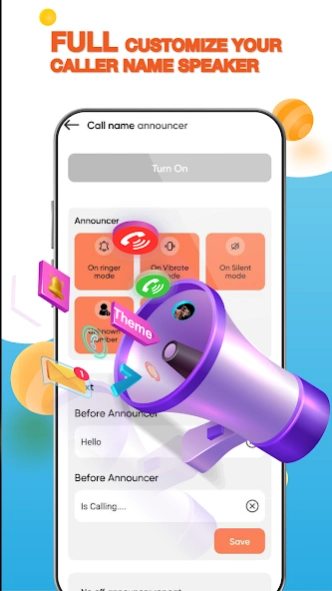
No need to check your phone when it rings. SMS talker and caller identifier will tell you the caller ID or announce phone number if it is not in your contacts. Not only calls, this call identifier app can also announce the sender's name and the content of WhatsApp messages. With Caller Name Announcer, you can:
- Choose to hear the caller name, the phone number, or both.
- Set caller ID for each contact
- Choose different announcement modes for different situations, such as ringer mode, vibration, silent mode, etc.
- Instantly know the name of the SMS sender and hear the text message.
Stay connected anytime, anywhere
Whether you are driving, this names of callers announcer app will read text message when someone sends you an SMS. This app works offline and online, so you can always hear the name caller even if they are not in your phone book or if you have no internet connection.
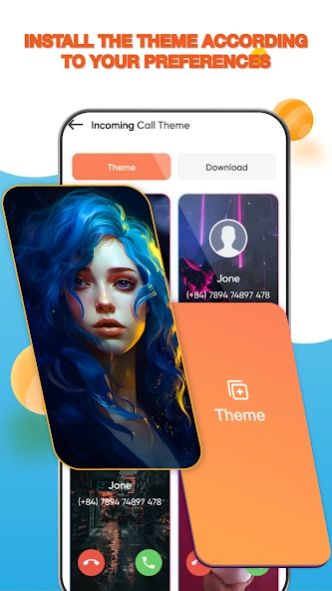
Customize your calling dialer with the incoming call theme changer
Make your call screen more attractive and stylish with the incoming call theme changer. You can choose from a variety of call screen themes and wallpapers, or create your own with your photos and images.
Know when your phone is running out of battery
Don't let your phone die on you unexpectedly. Caller Name Announcer can inform you of your battery status and alert you when it is low or fully charged. You can also set a custom announcement for each battery level.
Easily adjust volume and pitch rate of the call identifier
You can:
- Freely adjust the pitch rate and speech volume of the voice announcement according to your preference.
- Choose from different languages and accents for the voice
More than a caller ID app, Caller Name Announcer is a must-have app for anyone who wants to enjoy handsfree call and SMS announcer conveniently and safely while driving, working, or doing other tasks. Try Caller Name Announcer now to get connected with ease.
Thank you for using our app ❤️
About Caller Name Announcer
The company that develops Caller Name Announcer is Infinity Technologies Global. The latest version released by its developer is 1.2.2.
To install Caller Name Announcer on your Android device, just click the green Continue To App button above to start the installation process. The app is listed on our website since 2025-04-18 and was downloaded 2 times. We have already checked if the download link is safe, however for your own protection we recommend that you scan the downloaded app with your antivirus. Your antivirus may detect the Caller Name Announcer as malware as malware if the download link to com.itg.tools.callannoucer is broken.
How to install Caller Name Announcer on your Android device:
- Click on the Continue To App button on our website. This will redirect you to Google Play.
- Once the Caller Name Announcer is shown in the Google Play listing of your Android device, you can start its download and installation. Tap on the Install button located below the search bar and to the right of the app icon.
- A pop-up window with the permissions required by Caller Name Announcer will be shown. Click on Accept to continue the process.
- Caller Name Announcer will be downloaded onto your device, displaying a progress. Once the download completes, the installation will start and you'll get a notification after the installation is finished.
Program Details
System requirements
Download information
Pricing
Version History
version 1.2.2
posted on 2025-04-18
Caller Name Announcer For Android App
